

Exchange AD Split Permissions without regrets
Even organizations that have fully migrated their mailboxes to the cloud often still run on-premises Exchange servers and with them, an underestimated security risk for Active Directory. The "AD Split Permissions" model strips Exchange of the broad AD privileges attackers could exploit for a full domain compromise. Until now, adoption has largely failed due to the process changes it imposes on administrators. This article shows how to elegantly overcome exactly that hurdle: a script that selectively re-grants the lost AD permissions on the relevant OUs only, preserving the familiar admin workflow while still achieving the full security benefit.

TLDR: what if we remove the downsides?
I found a way to re-grant AD and RBAC permissions directly where Exchange users, groups, and contacts reside, requiring no changes for admins or identity management systems. In my experience, that friction has been the primary blocker for most companies. And we still retain the security benefits against lateral movement and domain compromise.
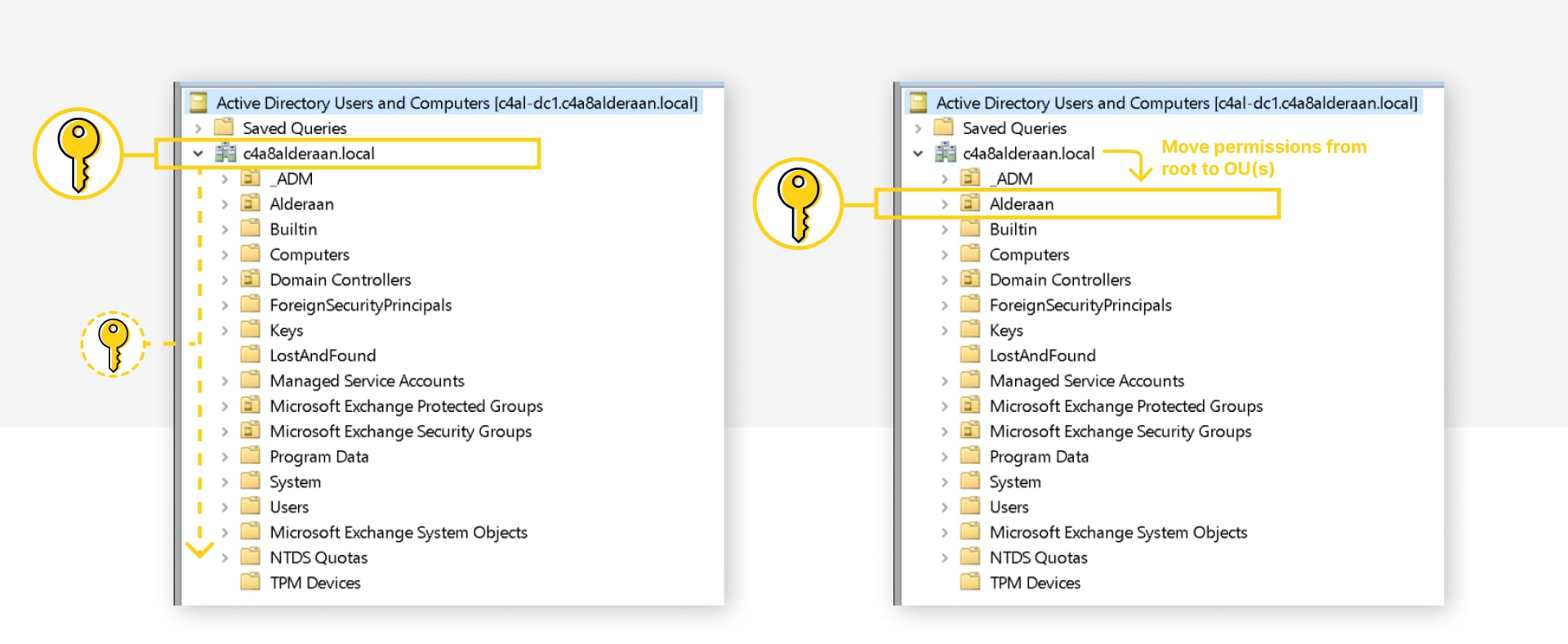
It’s achieved in three steps:
- Implement AD split permission model
- Grant Exchange servers the lost AD permissions, but only on the relevant OUs
- Grant Exchange RBAC to re-enable missing PowerShell cmdlets
All via Microsoft’s guidance, AD ACLs or Exchange RBAC assignments.
Why do we care (now)?
It has been largely overlooked or ignored since it was introduced with Exchange 2010 SP1. But the default shared permissions model represents a big security risk of Active Directory takeover. Combined with Exchange being notorious for remote exploits the last few years, it’s time to act!
The problem originates from privileges granted to the root of a domain that get inherited throughout the domain.
- modify permissions on users and groups (effectively full access)
- modify group members
- reset password on users
- create/delete users and groups
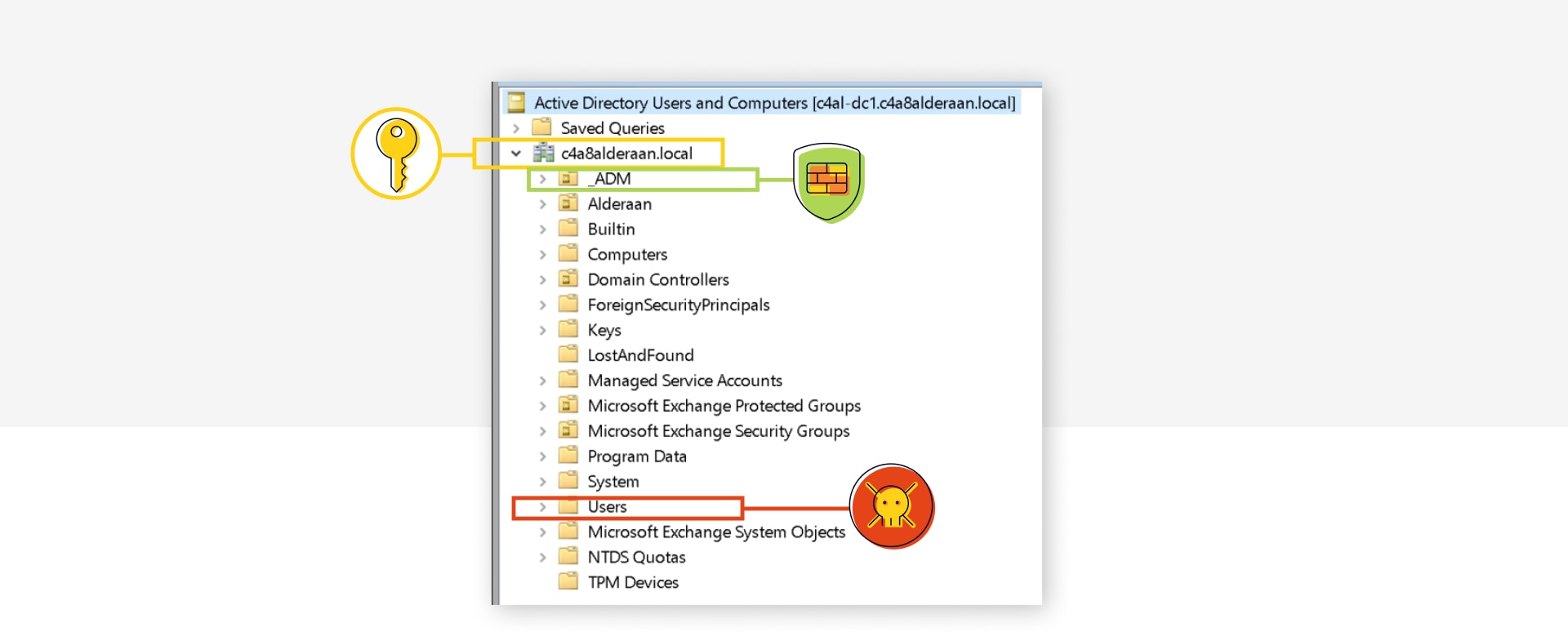
Only certain highly privileged Tier 0 users and groups are protected by the AdminSDHolder process (attribute admincount=1) and in many environments there will be unprotected users or groups that could allow compromise of the domain and/or forest or at least cause serious impact.
Prominent examples:
- Entra Connect Sync account when using Password Hash Sync
- Default groups
- Allowed RODC Password Replication Group together with Entra Connect account (if a real Windows RODC exists)
- Also see Untrustworthy Trust Builders: Account Operators Replicating Trust Attack (AORTA) - SpecterOps showing more paths (Account Operators group is a similar threat)
- Emptying Protected Users to create attack vectors by removing protections
- Unprotected custom groups or admin/service accounts
- Write permission on GPOs (applying to domain controller)
- Managing access to AD backups, backup server, PKI templates, hypervisor, ...
It is very hard to retroactively contain all these current and future potential pathways. For the _ADM custom OU, you could disable ACL inheritance, but most default objects may not be moved from the default Builtin OU or Users container and remain vulnerable.
It is much better to remove the powerful permissions from the root, which is done by implementing the Active Directory split permissions model. Configure Exchange Server for split permissions | Microsoft Learn
And Microsoft agrees “…encouraged to implement Active Directory split permissions” Active Directory Hardening Series - Part 7 – Implementing Least Privilege | Microsoft Community Hub
But why is no one doing it?
As split permissions weren’t available until Exchange 2010 SP1, everyone had accepted it by then and it seems that security teams did not manage to push it successfully once it existed.
And it would have forced changes to admin and IDM processes, like creating users or distribution lists in AD first and only afterwards using Exchange to “mail enable” them.
Info: The following cmdlets will no longer be available or working: Add-DistributionGroupMember, New-DistributionGroup, New-Mailbox, New-MailContact, New-MailUser, New-RemoteMailbox, Remove-DistributionGroup, Remove-DistributionGroupMember, Remove-Mailbox, Remove-MailContact, Remove-MailUser, Remove-RemoteMailbox, Update-DistributionGroupMember, Add-ADPermission, Remove-ADPermission
Adoption examples:
- New-Mailbox (where Exchange writes to AD) would be:
- New-ADUser (where adm.jdoe writes to AD)
- Enable-Mailbox
- Add-ADPermission for SendAs rights would have to be done via AD users and computers in the security tab and often requiring additional AD permissions for standard admins.
Show me this no-regrets option!
Disclaimer: Please fully read and understand the following links and articles, perform it in a test environment first, make sure AD backups are current and recovery practices are established!
Audit current usage
You should first check which of the affected cmdlets are in use on which OUs:
$CsvPath = "C:\temp\SplitPermissionAdminAuditLog.csv"
$Cmdlets = "Add-ADPermission","Remove-ADPermission","New-DistributionGroup","Remove-DistributionGroup","Add-DistributionGroupMember","Update-DistributionGroupMember","Remove-DistributionGroupMember","New-Mailbox","Remove-Mailbox","New-RemoteMailbox","Remove-RemoteMailbox","New-MailUser","Remove-MailUser","New-MailContact","Remove-MailContact"
Search-AdminAuditLog -ResultSize 99000 -Cmdlets $Cmdlets | Select-Object RunDate,Caller,ObjectModified,CmdletName,@{Name='CmdletParameters';Expression={[string]::join(",", ($\_.CmdletParameters))}},succeeded,error | Export-Csv -Path $CsvPath -Delimiter ";" -Encoding Unicode -NoTypeInformation
Quick Analysis of caller and cmdlets:
$CSVs = Import-Csv -Path $CsvPath -Delimiter ";"
$CSVs | Group-Object Caller
$CSVs | Group-Object CmdletName
Analyze the CSV for where AD permissions will be needed. Potentially optimize by moving all Exchange-relevant groups into dedicated OUs.
Enable Split Permissions Model
Follow Microsoft's instructions "Switch to Active Directory split permissions" in Configure Exchange Server for split permissions | Microsoft Learn(NOT RBAC split permissions)
In essence, it will remove the dangerous permissions of the "Exchange Windows Permissions" group and also remove Exchange as a group member.
Setup.exe /IAcceptExchangeServerLicenseTerms_DiagnosticDataOFF /PrepareAD /ActiveDirectorySplitPermissions:true/ActiveDirectorySplitPermissions:falseGrant AD Permissions
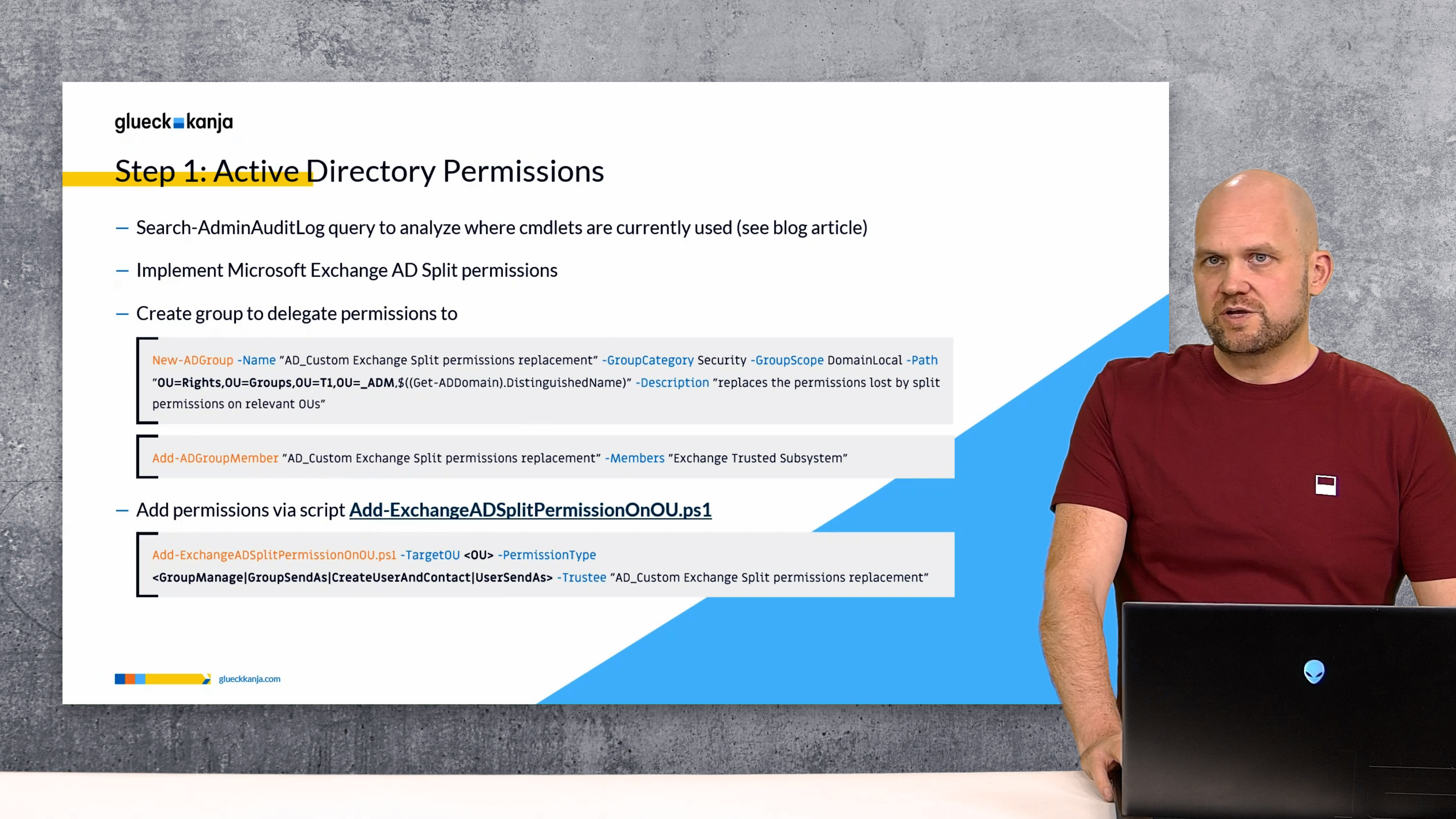
Create a custom AD group and make Exchange servers members.
# adjust OU Path first!
New-ADGroup -Name "AD_Custom Exchange Split permissions replacement" -GroupCategory Security -GroupScope DomainLocal -Path "OU=Rights,OU=Groups,OU=T1,OU=_ADM,$((Get-ADDomain).DistinguishedName)" -Description "replaces the permissions lost by split permissions on relevant OUs"
Add-ADGroupMember "AD_Custom Exchange Split permissions replacement" -Members "Exchange Trusted Subsystem"
# reboot Exchange servers for permissions via group to work
I’ve created a script to make delegating the AD permissions easy per use case.
Without these permissions the Exchange server would receive the error
“INSUFF_ACCESS_RIGHTS”from AD.
Download Add-ExchangeADSplitPermissionOnOU.ps1 from glueckkanja GitHub
It can grant the following PermissionTypes:
CreateUserAndContact
Create/delete, ResetPassword and WriteAllProperties for Users and Contacts
Exchange cmdlets: `New-Mailbox`, `New-RemoteMailbox`, `New-MailUser`, `New-MailContact` and matching `Remove-*`
GroupManage
Create/Delete Groups, Modify Member
Exchange cmdlets: `New-DistributionGroup`, `Remove-DistributionGroup`, `Add-DistributionGroupMember`, `Update-DistributionGroupMember`, `Remove-DistributionGroupMember`
Also: user managing DistributionGroups they own via EAC
UserSendAs
Modify AD Permissions on Users
Exchange cmdlet: `Add-ADPermission`
GroupSendAs
Modify AD Permissions on Groups
Exchange cmdlet: `Add-ADPermission`
How to use the script:
Add-ExchangeADSplitPermissionOnOU.ps1 -TargetOU <OU> -PermissionType <GroupManage|UserSendAs|GroupSendAs|CreateUserAndContact> -Trustee "AD_Custom Exchange Split permissions replacement"
# For example
Add-ExchangeADSplitPermissionOnOU.ps1 -TargetOU "OU=ExchangeGroups,OU=HQ,OU=Alderaan,$((Get-ADDomain).DistinguishedName)" -PermissionType GroupManage -Trustee "AD_Custom Exchange Split permissions replacement"
Add-ExchangeADSplitPermissionOnOU.ps1 -TargetOU "OU=ExchangeGroups,OU=HQ,OU=Alderaan,$((Get-ADDomain).DistinguishedName)" -PermissionType GroupSendAs -Trustee "AD_Custom Exchange Split permissions replacement"
Add-ExchangeADSplitPermissionOnOU.ps1 -TargetOU "OU=Users,OU=HQ,OU=Alderaan,$((Get-ADDomain).DistinguishedName)" -PermissionType UserSendAs -Trustee "AD_Custom Exchange Split permissions replacement"
Add-ExchangeADSplitPermissionOnOU.ps1 -TargetOU "OU=Users,OU=HQ,OU=Alderaan,$((Get-ADDomain).DistinguishedName)" -PermissionType CreateUserAndContact -Trustee "AD_Custom Exchange Split permissions replacement"
Grant Exchange RBAC
Re-enable -BypassSecurityGroupManagerCheck parameter for Add-DistributionGroupMember and Remove-DistributionGroupMember cmdlets:
New-RoleGroup -Name "SplitPermission Security Group Creation and Membership" -Roles "Security Group Creation and Membership" -Members "Organization Management","Recipient Management" -Description "Brings back -BypassSecurityGroupManagerCheck to Add-DistributionGroupMember, but also needs AD ACL for Exchange Server on target DLs"Info: Else you get "-BypassSecurityGroupManagerCheck parameter is not available" or "You don't have sufficient permissions. This operation can only be performed by a manager of the group"
Re-enable New-Mailbox, New-RemoteMailbox, New-MailContact, Remove-... cmdlets with needed parameters:
New-RoleGroup -Name "SplitPermission Mail Recipient Creation" -Roles "Mail Recipient Creation" -Members "Organization Management","Recipient Management" -Description "Brings back New-Mailbox, New-RemoteMailbox, New-MailUser, New-MailContact and matching Remove-... cmdlets, but additionally Exchange needs AD ACL for Exchange Server on target OUs"Conclusions
I hope this guide helps more organizations take the important step of securing their Active Directory against compromise via Exchange. In my experience implementing the Exchange AD Split Permissions model across multiple customers, I have not encountered any issues and the adoption has been smooth.
I also hope Microsoft will introduce a native, OU-based approach to achieve this level of granularity, rather than the current all-or-nothing model, which would make widespread adoption significantly easier.
A note on AD Tiering: Please do not log on to Exchange servers with Domain Admin or any other Tier 0 accounts. Treat Exchange servers as Tier 1 and implement AD Tiering as soon as possible. As a first step, I recommend using PingCastle or Purple Knight to assess your AD security posture and identify control path exposures.
Similar Posts

The End of MFA via SMS
Why organizations should move to phishing-resistant and passwordless authentication now.

ClickFix. When the user is the exploit, and how to stop it
ClickFix turns users into their own attacker: a fake CAPTCHA, a copy-paste, and malware runs in memory with nothing on ...
Admin Work and Everyday Work on One Machine? Game Over.
Why one tenant is not enough for CIOs, and why the second one is rarely part of the plan. The ...
Four Times Leader. glueckkanja in the ISG Study Germany 2026
The ISG Provider Lens® study 2026 positions glueckkanja as a Leader in Germany in four quadrants: Microsoft Productivity and Business ...
From Rising Star to Leader. glueckkanja in the ISG Study Switzerland 2026
The ISG Provider Lens® study 2026 positions glueckkanja as a Leader in Switzerland in the Microsoft AI and Cloud Ecosystem ...

Outbreak. What the OpenAI/Hugging Face incident reveals and what it doesn't
An AI agent breaks out of its test environment, finds a zero-day, and hacks another company. Sounds like a movie ...
Leader and Rising Star. glueckkanja in the ISG Cybersecurity Study 2026
The ISG Provider Lens® study Cybersecurity 2026 names glueckkanja a Leader in the Next-Gen SOC/MDR Services (Midmarket) quadrant. In the ...
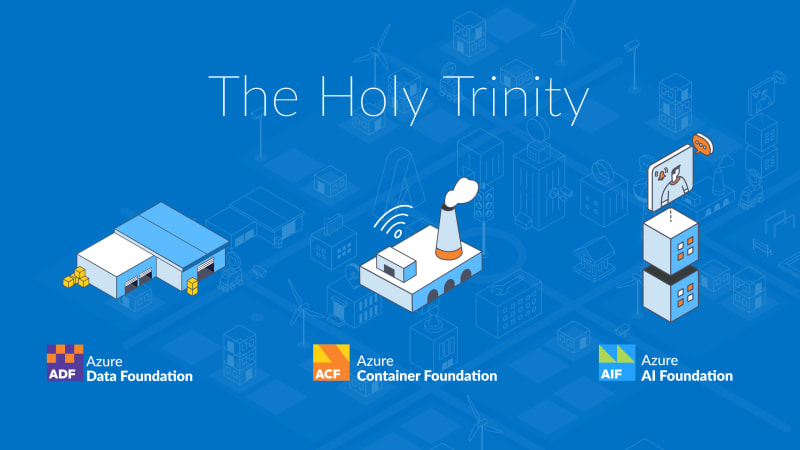
The Holy Trinity: What AI Actually Needs to Get to Work
A manufacturing company wants to know which of its 14,000 SKUs actually turn a profit. The answer sits in three ...

Contract Signed: Here's How Your Onboarding Works
Your contract is signed, the first big step is done. But what happens now? We take you behind the scenes ...

Microsoft Frontier Partner: we are among the few
Microsoft has recently introduced a new top-tier recognition within its AI Cloud Partner Program: the Frontier Partner Badge. It is ...

160 Kilometers for a Good Cause
Eleven colleagues, 16 laps, 160 kilometers, a thunderstorm, and a podium finish: glueckkanja took part in the Frankfurter Runden 2026 ...

Anatomy of an Unknown AMOS Stealer: From Alert to Immunity in Hours
A previously undocumented AMOS stealer variant compromised a macOS endpoint. No known hashes, no C2 data in any public database. ...

Why Edge Should Be Your Only Corporate Browser
The browser nobody satisfies chose became the one everybody manages. Most companies never made a deliberate decision for Chrome; it ...

No Malware Needed. Just One Admin Account.
On March 11, 2026, Handala wiped devices across 79 countries using nothing but a compromised Intune admin account. No malware, ...

Six Agents. Four Weeks. Real Production.
Six companies, four weeks of building, six working AI agents — that was the first glueckkanja AI Agent Hackathon. Kiekert, ...