Preventive Services
Every one of these issues was already known
Our incident response work has shown us what compromised environments have in common: an Active Directory that still accepts NTLMv1, a tenant where Conditional Access has more exceptions than rules, a subscription whose Owner role is inherited through a nested group, a backup from a domain controller in a lower tier, and the day after, no way to reach your own team because mail and Teams went down with the tenant. None of these issues were news to the people responsible. They just sat side by side instead of in sequence, and nobody had looked at them together.
That is exactly what the Preventive Services do. We interview the people who run your environment, run our tooling across Active Directory, Entra ID, or Azure, and assess every finding by its impact: what makes a compromise more likely, what allows it to spread, and what would leave you unable to act when it matters. What goes to the top of your roadmap is whatever prevents the next incident or helps you survive it, and that is where you start.
Four services, one method
Active Directory, Entra ID, and Azure are three distinct management worlds, each with its own role models and tooling, and through Entra Connect, Hybrid Join, and subscriptions they are more tightly coupled than the people running them tend to realize day to day. That is why we assess each world separately, following the same method of interview, tool-assisted analysis, and report. A fourth service goes deeper on tiering across Active Directory and Entra ID, a topic the AD and Entra ID services cover only as one section among many. Each service can be booked on its own.
Active Directory
Your directory is the most valuable target in the network for attackers: whoever takes it over takes over everything. Drawing on experience from projects, operations, and incident response, we assess how well it is hardened against compromise.
What we review
- Active Directory architecture and baseline configuration
- Administration concept, tiering model, and admin workstations per the Enterprise Access Model
- Hardening and legacy protocols such as NTLM, LanManager, SMBv1, as well as outdated TLS versions and ciphers
- Escalation paths and misconfigurations, including via ACLs
- Public Key Infrastructure (AD CS)
- Entra Connect and AD FS as the bridge between on-premises and cloud
- Security tool coverage: AV, EDR, IDS/IPS, SIEM
- Disaster recovery and business continuity, both technical and organizational
- Duration: Interview, local analysis without cloud permissions, joint review session
- Outcome: Report with prioritization, hardening roadmap, and guidance for your incident response plans
Entra ID
Whoever controls your tenant controls identities, data, and devices. We assess how well your tenant is prepared against attacks and where the configuration falls short of your own standards.
What we review
- Hybrid identity and tenant-level configuration
- Identity lifecycle
- Identity security, including Conditional Access and its exceptions
- Zero Trust implementation
- Privileged identity and access management, covering permanently assigned versus eligible roles
- App integration and workload identities, including consent and API permissions
- Operational excellence and security operations
- Duration: Two interviews of approximately two hours each, manual and tool-assisted analysis, review session
- Outcome: Report with prioritization, hardening roadmap, and guidance for your incident response plans
Azure
An Azure environment grows faster than its governance. We review your landing zone for gaps in security, governance, and operations, and show you where an attacker could move from a workload all the way to the control plane.
What we review
- Azure billing and Entra ID tenant
- Identity and access management, including role assignments via management groups and service principals
- Network topology and site connectivity
- Security
- Management
- Resource organization
- Platform automation and DevOps
- Governance
- Duration: Interview covering architecture, operations, and strategy, tool-assisted analysis, review session
- Outcome: Report with prioritization and hardening roadmap based on established best practices
Tiering for AD and Entra ID
Many organizations have a tiering model on paper and tier violations in practice. The Preventive Services for AD and Entra ID touch on tiering as one section among many; this service goes into depth, covering Active Directory and Entra ID in a single pass: how far your administration model deviates from the Enterprise Access Model, who actually holds Tier-0 rights today, and where the boundaries are being crossed.
What we review
- Active Directory: what constitutes Tier 0 within the directory itself, via ACL permissions and central services such as AD CS
- Active Directory: indirect Tier-0 paths via virtualization, monitoring, or systems management, clarified in conversation with you
- Entra ID: how privileged roles are assigned in Entra RBAC and mapped to tiers
- Across both: the maturity of your administration model and the integration of your Active Directory into a Red Tenant architecture
- Duration: Workshop on the Enterprise Access Model, followed by a tool-assisted maturity and tiering assessment
- Outcome: Maturity review, tier boundary violations as an analysis result, and recommendations for next steps
PAWlyzer shows you how exposed your Tier 0 admins are in 60 minutes
It finds the accounts with control plane roles in your Entra tenant, evaluates their privileged activities and devices, and distills both into an Exposure Score. We run the check together with you, it costs nothing, and the findings are yours.
Go to PAWlyzer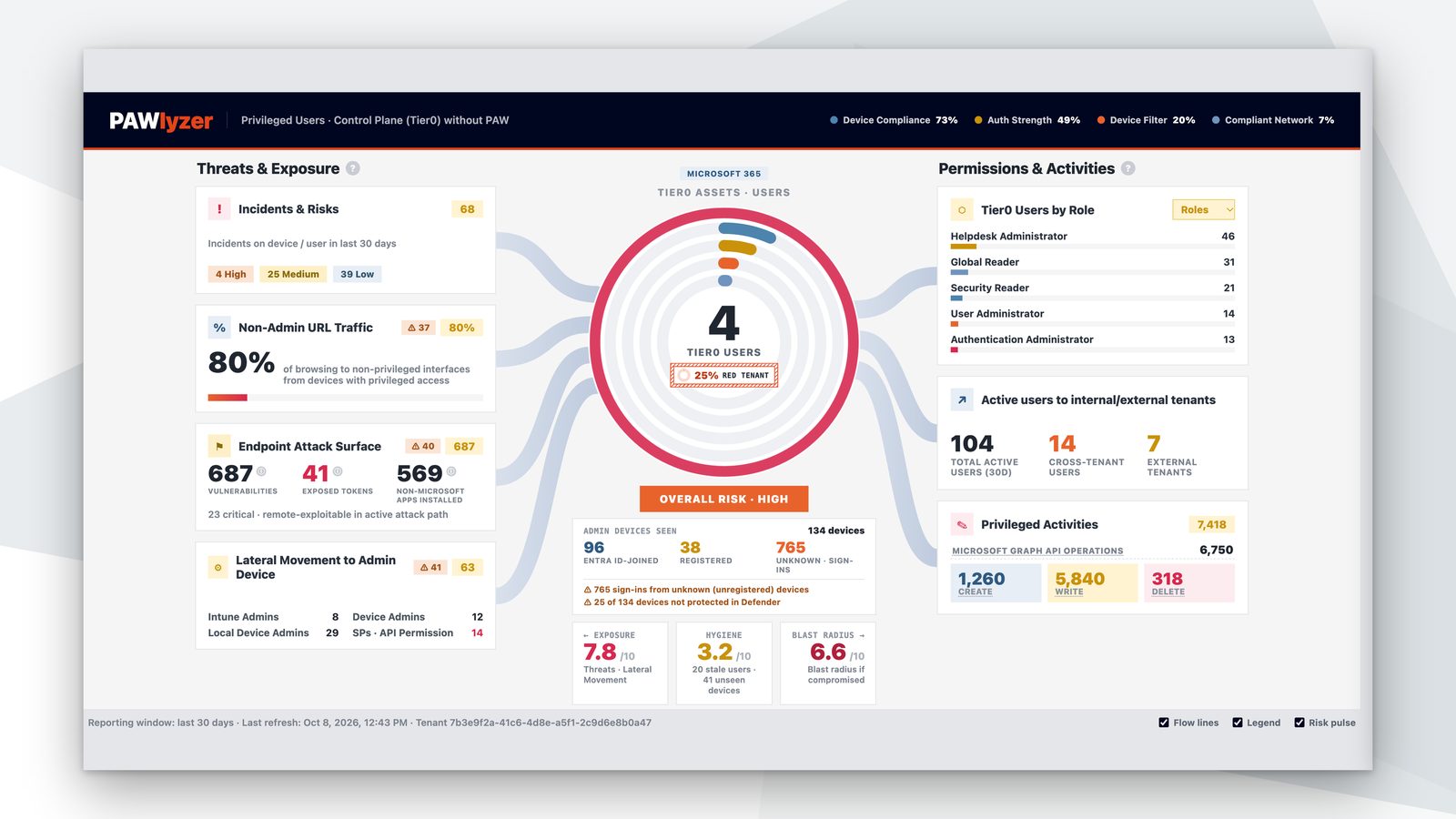
How a Preventive Service works
- Understanding your environmentUnderstanding your environmentWe start with an interview with the people who run your environment, covering architecture, tooling, operational processes, backup strategy, and selected configurations. For Entra ID, this typically takes place across two sessions of around two hours each; for tiering, it takes the form of a workshop on the Enterprise Access Model. Many things a tool flags later have a backstory, and we want to know it before we draw any conclusions.
- Gathering findingsGathering findingsWe then analyze your environment using tooling, automatically surfacing vulnerabilities, misconfigurations, and areas for improvement. For Active Directory, the tool runs locally without a multi-tenant app and without cloud permissions; for Entra ID and Azure, read access is sufficient. Every finding is weighed against what we know from projects, operations, and incident response about the same pattern.
- Delivering the reportDelivering the reportWe wrap up by presenting the results in a joint session. You receive a report that puts your current state in context, prioritizes the findings, and gives actionable recommendations based on best practice, along with a hardening roadmap and guidance for your incident response plans. Implementation stays with you or becomes its own project with us.
What comes before and after
Questions we get before the first service
The questions from initial conversations, answered the way we answer them there.
Do we have to book all four Preventive Services?
No. Each service stands on its own, with its own interview, its own analysis, and its own report. Most customers start where their identities live, meaning Active Directory, or Entra ID for pure cloud environments, and decide after the first report whether Azure or tiering comes next.
Don't the Preventive Services for AD and Entra ID already cover tiering?
Partly. Both take a look at your administration model, as one section among many. The Preventive Service Tiering goes into depth: with a workshop on the Enterprise Access Model, a combined analysis of privileged access in Active Directory and Entra ID, and a maturity assessment. Anyone who wants to implement tiering seriously needs that depth.
What does the tooling need to run?
Read access, and nothing more. For Active Directory, the analysis tool runs locally without a multi-tenant app and without any cloud permissions. For Entra ID, you set up a personal cloud-only admin account with the Global Reader role and read access to the Azure subscriptions, plus a single-tenant app registration with read access to the Graph API; if Microsoft Defender RBAC is active, a read permission there is added to the list. You will receive the exact list before the session.
Does any data leave our environment?
Only what you give us. The analysis runs in your environment; for the report we work with the exports you release for evaluation, and we agree upfront on what they may contain.
How long does a Preventive Service take?
It depends mainly on the availability of the people who know your environment. For the Preventive Service Entra ID, plan for two interviews of around two hours each and a review session of one to two hours; the analysis in between is on us. Active Directory and Azure follow a similar pattern, and tiering starts with a workshop.
What does a Preventive Service cost?
Each service has a fixed price, regardless of the size of the environment or how many findings the report surfaces. We share the number in the initial conversation. Implementation of the recommendations is not included; anyone who wants to tackle that with us can do so as a separate project.
Is a Preventive Service a penetration test?
No. A pentest determines whether an attacker can get in; a Preventive Service shows how your configuration is positioned against compromise and what to harden first. The two complement each other, and anyone planning both should start with the Preventive Service, because it produces the list that a pentest will later put to the test.
How does the Preventive Service Tiering differ from PAWlyzer?
In depth. The PAWlyzer shows in 60 minutes how exposed the Tier-0 admins in your Entra tenant are when they work without a Privileged Access Workstation. The Preventive Service Tiering covers the entire administration model, in Active Directory and Entra ID, through a workshop, tool-assisted analysis, and interviews, and assesses its maturity against the Enterprise Access Model.
How do the Preventive Services differ from the Managed CSOC?
They complement each other. The CSOC detects attacks and responds to them, around the clock. The Preventive Services reduce how many reach you in the first place and ensure you can act when it matters. For our customers, having both is the norm, and either one works on its own as well.