


Copilot reads what you're allowed to read. Not always a good plan.
What Copilot and Agents find in your tenant isn't in the Microsoft documentation. It's in your permissions. We make sure both are right.

Before Copilot, oversharing had no noticeable consequences, because no human had the time to search through all the documents of an average company. Copilot has that time. It takes seconds, and it doesn't look for problems — it simply finds them, because it accesses whatever the respective user is allowed to read via Microsoft Graph, and in most tenants the average employee has access to around 130,000 files that were never intended for them. The most common first effect after a Copilot rollout is therefore not increased productivity, but unwanted transparency.
That's not an argument against Copilot. It's an argument for sequence. Permissions, Sensitivity Labels, DLP policies, the configuration of the Copilot Control System and the question of which admin centers matter before the first rollout: these tasks existed before Copilot just as they do after it, but the reason to tackle them systematically was never as tangible as it is now. Copilot in this sense is not a problem — it's an opportunity to set up the tenant the way it should always have been.
What Copilot is, what an Agent is, and why the difference matters
The distinction Microsoft draws between Copilot and Agents is technically precise but often blurry in communication, which leads companies to either expect too much or start at the wrong end. The simplest line runs along the question of autonomy.
M365 Copilot and Copilot Chat are interactive assistants that answer questions, summarize content and draft texts, always based on what the user is allowed to read via Microsoft Graph. They don't act, they assist. Declarative Agents — SharePoint Agents or agents from the Agent Builder — extend this approach with a limited, predefined knowledge scope, but make no independent decisions and execute no system actions.
Agents only become truly autonomous as Custom Engine Agents, built in Copilot Studio, Power Platform or Azure AI Foundry: these can be triggered event-driven, communicate with external services and execute actions without a human confirming every step. Those who don't understand this distinction either build agents for tasks a simple Copilot prompt would handle just as well, or expect a Declarative Agent to have an autonomy that's architecturally not designed for it.

Copilot and Agents require a platform built for them
Copilot accesses data via Microsoft Graph that the user is allowed to read, and Agents operate within the system boundaries defined by the respective platform. If those boundaries were never explicitly set — because the tenant has grown organically and was never designed for AI access — Copilot and Agents will technically run, but in an environment optimized for neither performance nor governance.
Our Cloud Workplace Foundation lays the M365 base that Copilot needs: permission structure, Sensitivity Labels, DLP, governance policies — not bolted on afterwards, but integrated from the start. For Agents operating in Azure, the same applies: the Azure Foundation and the Azure Container Foundation ensure the ground is solid before building begins. Deploying Agents in an environment without this foundation is deploying on sand.
Our offerings

M365 Copilot Tech Readiness
We analyze your tenant, review permissions and identify oversharing risks before the first Copilot user is activated.

Microsoft 365 Copilot Workshop
From requirements to roadmap: in three days we prepare your organization for using M365 Copilot.

glueckkanja AI Agent Hackathon
You bring a real use case, we guide you from architecture to deployment. At the end, the agent runs in your environment.
More on Copilot and Agents

Six Agents. Four Weeks. Real Production.
Six companies, four weeks of building, six working AI agents — that was the first glueckkanja AI Agent Hackathon. Kiekert, ...
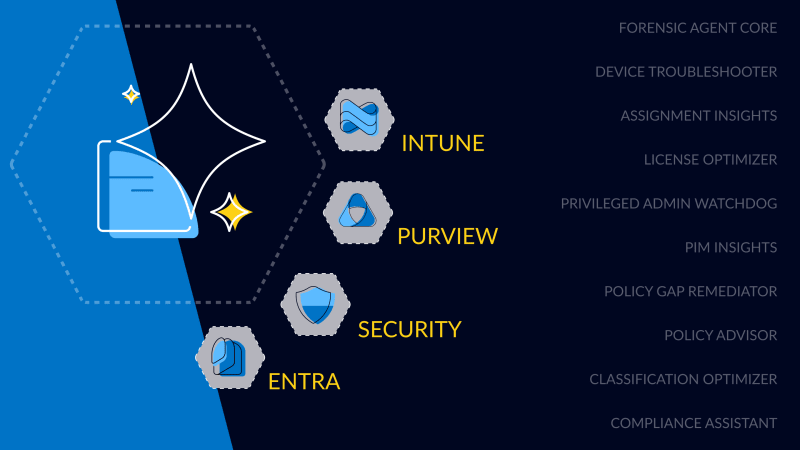
First Worldwide: glueckkanja Security Copilot Agents
glueckkanja is among the first partners in the Microsoft Security Store Preview, delivering 10 Microsoft-native Security Copilot Agents across Security, ...

Global Secure Access Unlocked
This blog explores how Microsoft Global Secure Access enhances security and control in our Managed Red Tenant. With Entra Internet ...
This is why you need a solid infrastructure to be agent-ready in 2025
Before Microsoft 365 Copilot Agents can deliver real value, the foundation must be solid: clean data, proper permissions, and a ...

glueckkanja @ RSA Conference
When the RSA Conference opens its doors from May 6 to 9, 2024, the glueckkanja team around CEO Christian Kanja ...
glueckkanja is one of the first Microsoft Security Copilot Partners
glueckkanja AG announces that Microsoft has selected the company for the Security Copilot Partner Private Preview. Recognized for its expertise ...
glueckkanja is among the first Microsoft Security Copilot partners
glueckkanja announced today that Microsoft has selected the company for the Microsoft Security Copilot Partner Private Preview. With its expertise ...