






AuthCodeFix aka. ConsentFix
You've discovered an exciting position with us and want to apply? Great – we're always happy to welcome new talent! But what happens after you click 'Submit Application'? Here we give you a behind-the-scenes look.
As it is tradition right before the end of the year, a new vulnerability or clever attack vector appears, and Defenders are left trying to protect their users. Meanwhile, other attackers and red teamers watch closely and adapt.
This year, PushSecurity detected an attack that they named "ConsentFix", an evolution of the ClickFix attack that relies on the user to provide the attacker with a URI that basically hands over the key to the Entra kingdom. The method used in the wild relied on a manual copy and paste action by the user to work. Within a few days, John Hammond released a video demonstrating an improved version of the attack that no longer required copy and paste, instead, the user could simply drag and drop their auth code to the attacker.
When we look into the technical details of why this attack works and seemingly bypasses device compliance and other Conditional Access requirements, we find ourselves in the OAuth 2.0 authorization code flow.
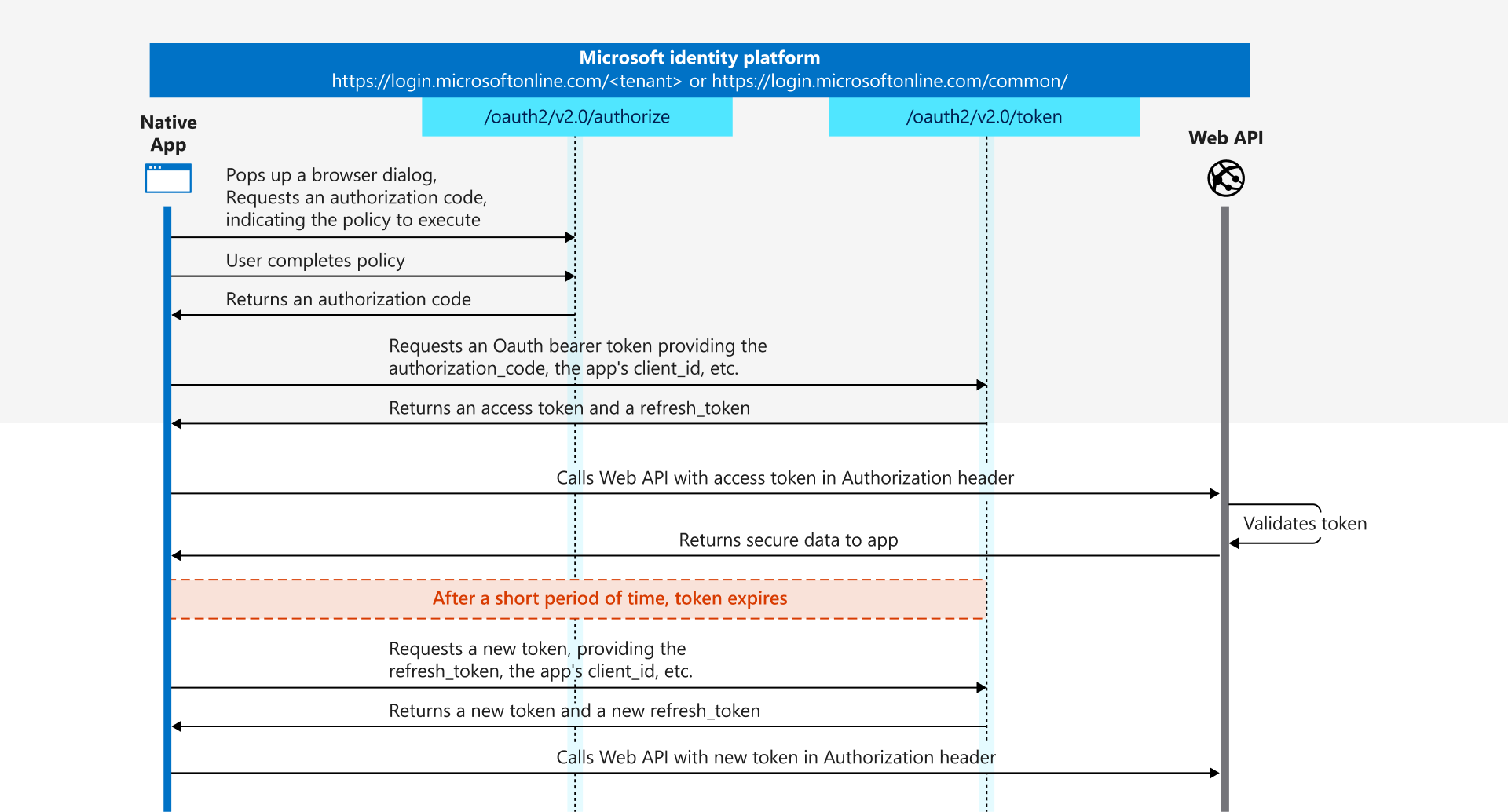
The attacker creates a Microsoft Entra login URI that targets the "Microsoft Azure CLI" client and the "Azure Resource Manager" resource, and opens this URI when the user visits the malicious website.
Mapped to the authorization code flow, this corresponds to the first step that a native public app such as the Azure CLI would normally call to authenticate the user. The application creates a listener on the machine on which it is executed, on a random high port. This port is used as a so called reply URI.
You can easily reproduce this yourself, for example by using TokenTacticsV2, or by crafting the URI manually.

After the user successfully signs into Entra ID it's redirected to the reply URI, e.g. http://localhost:3001. In a normal scenario, the Azure CLI would now accept the call to this URI and would receive the important and critical information that is part of the redirect:
- code
This is the authorization_code, that the application uses to request a bearer token, which consists of access, id, and optional the refresh token.
According to the documentation this code is valid for around 10 minutes and must be redeemed within this time. - state
This is an optional parameter, and the application should verify whether it is identical in the request and response.
In the attack scenario, the user is also redirected, but since no application is running on localhost, the browser encounters an error.
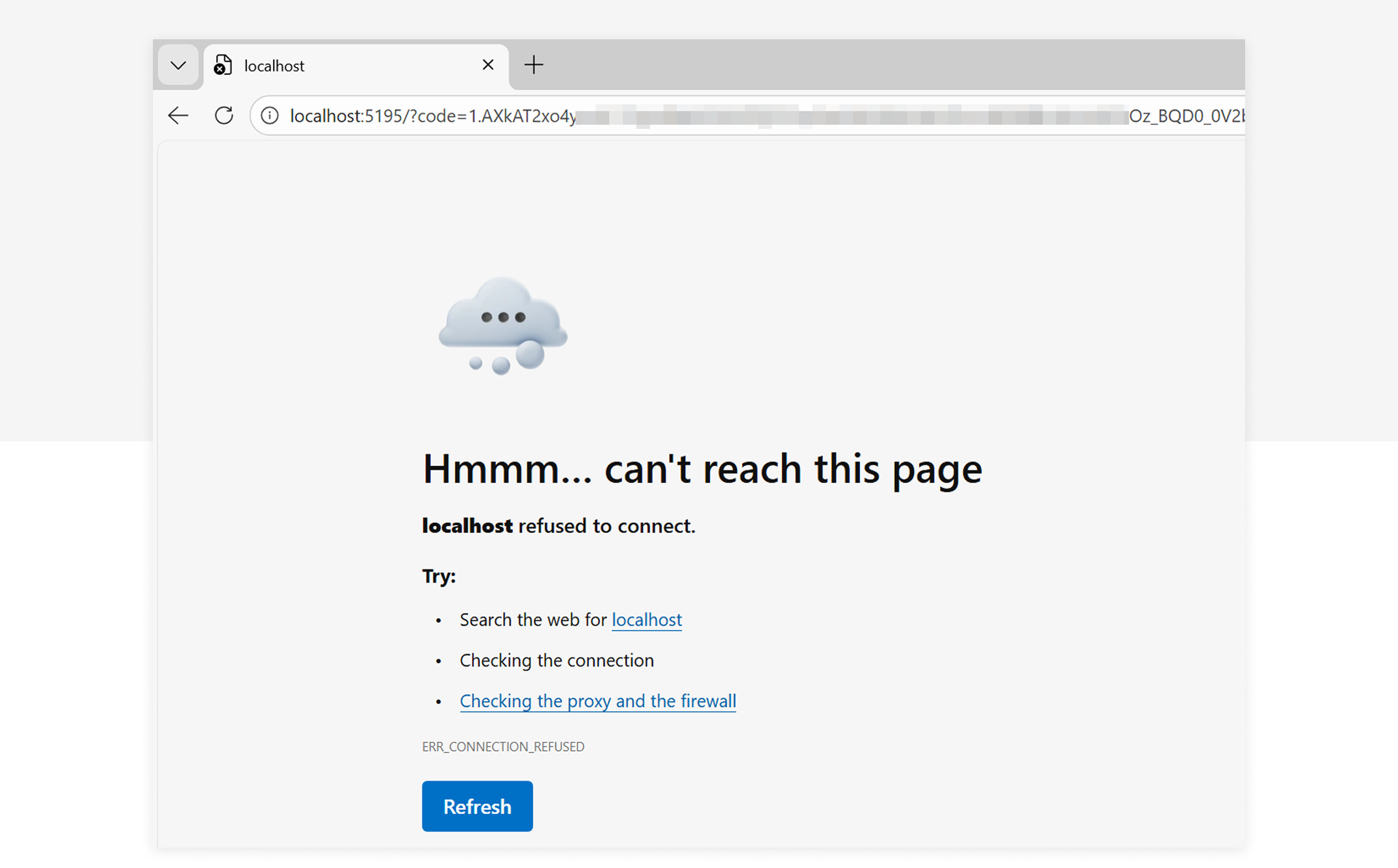
But the URI still contains the sensitive information and this is what the attacker wants the user to provide them. If the user obliges the attacker will now redeem the token material and can then use the access and refresh token to access the resource, in this case Azure Resource Manager.
In this screenshot you will see how to retrieve the bearer token using the URI provided by the user.
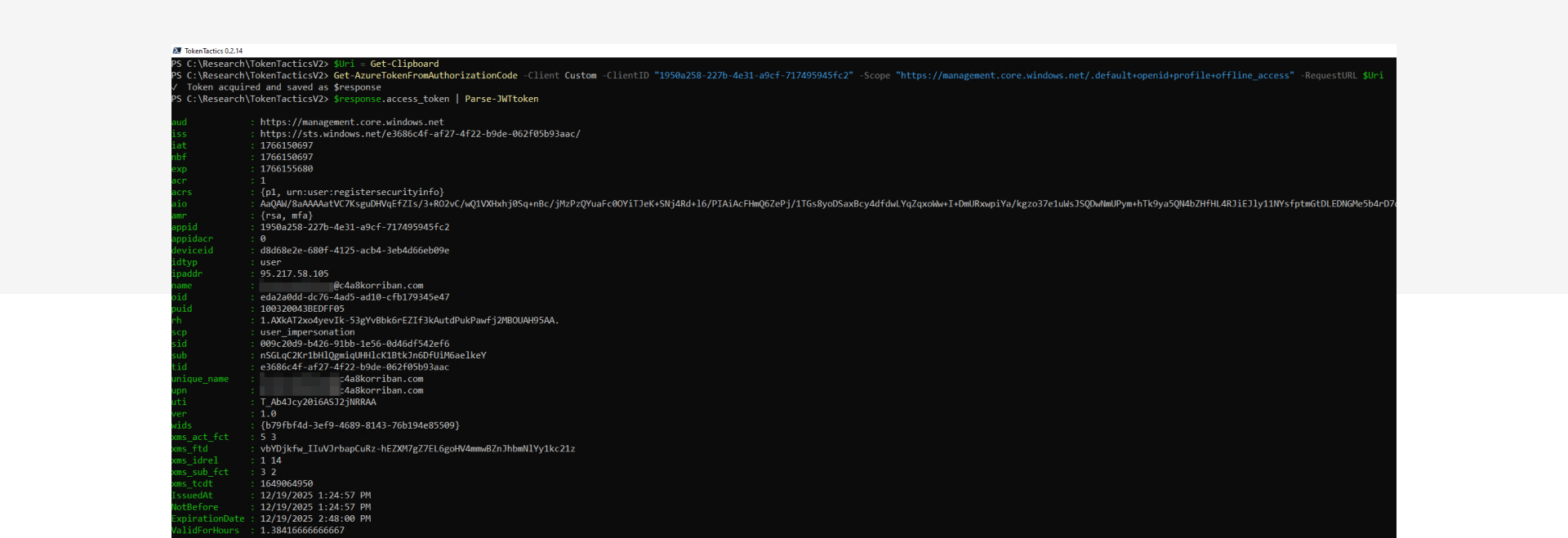
If you want to test your detections, make sure you execute the last step from a different system, in a different network.
Detection artifacts
When you reproduce the attack and check the SigninLogs and AADNonInteractiveUserSignInLogs there will be two events for this one sign in activity. The first one is the actual user, the second from the attacker controlled infrastructure.

The big difference is that the first event is an interactive sign in event, while the second is non-interactive. This translates to the two stages of the authentication flow, first the user then the application or in out case the attacker.
Regular behavior of the Azure CLI would be that both of those sign in events originate from the same IP address. But in our case the IP address is different. Not only different but from different countries. Of course the last part is not a good indicator, as the attacker could reside in the same country as the victim to hide their tracks.
Missing link
When looking for a good way to link those two events the natural first idea was to check the Unique Token Identifier (UTI). The hope was that Microsoft would use the same value but it seems the auth code UTI and the bearer token UTI are different.

But the SessionId is a good link between the two, yet it's a long running id and might contain multiple of these event combinations, even legitimate ones.
With the additional knowledge of the auth code flow limitations and the user and application id as additional links you can use time as an important detection factor:
- Both events share the same SessionId
- Both events share the same ApplicationId
- Both events share the same UserId
- The second event must be after the first event
- The second event must be within a ~ 10 minute time window after the first event
You should not use exactly 10 minutes as Microsoft writes "[...] they expire after about 10 minutes" - You should only consider the very next second event, not subsequent ones
{% hint style="info" %}
Fun fact
The ResourceIdentity is not a good link, as the attacker can change the resource as it's not bound to the auth code. The targeted application id cannot be changed.
{% endhint %}
Reduce the noise
This knowledge already presented us with a good working detection, but there were benign positives in the mix as well. Modern developers are strange and use cloud resources that feel like local instances, but in the logs scream irregular logins.
The big difference here is the time component again. While the attack requires user interaction to copy+paste or drag'n'drop the URI, the GitHub Codespace use case we identified as the source of the benign positive alerts is completely automated and manages to redeem the auth code within mere seconds.
So filtering out anything that does this authentication dance within a few seconds can most likely be removed as benign.
Another source of noise could be changing egress points for your internet traffic, especially in SD-WAN, ZTNA or Secure Web Gateway scenarios.
Affected first-party applications
While the initial report shows "Microsoft Azure CLI" as the abused application there are a lot of different Microsoft first-party apps with pre-consent in every tenant that offer localhost as redirect. And not only those are a target. The attacker could also abuse reply test and dev URLs that are not publicly resolvable.
Here is a list of the most notable applications that also have high pre-consentet permissions on resources.
- Microsoft Azure CLI (04b07795-8ddb-461a-bbee-02f9e1bf7b46)
- Microsoft Azure PowerShell (1950a258-227b-4e31-a9cf-717495945fc2)
- Visual Studio (04f0c124-f2bc-4f59-8241-bf6df9866bbd)
- Visual Studio Code (aebc6443-996d-45c2-90f0-388ff96faa56)
- MS Teams PowerShell Cmdlets (12128f48-ec9e-42f0-b203-ea49fb6af367)
A full list of these apps are now included in EntraScopes.com by our colleague Fabian Bader.
Mitigations and Protections
Limit the attack surface and audience
Deployment effort: Low to High (depends on effort to identify legitimate users)
Mitigation: Medium (reduces the potential audience for the attack)
Scope: Limited
Option 1: Require User Assignment
Pre-requisites:
- Add the service principal for affected first-party apps by using Microsoft Graph API or PowerShell
- Apply the user assignment requirement on the service principal object using Microsoft Graph API or PowerShell
- Establish a process to assign users upon request via Access Packages, PIM-for-Groups (for just-in-time access), or a combination of both.
// Example for Microsoft Graph PowerShell
Connect-MgGraph -Identity
$AppId = "04b07795-8ddb-461a-bbee-02f9e1bf7b46" // Microsoft Azure CLI
$sp = Get-MgServicePrincipal -Filter "appId eq '$AppId'"
Update-MgServicePrincipal -ServicePrincipalId $sp.Id -AppRoleAssignmentRequired:$false
Benefit:
- Enables management of user assignments through Access Packages or manual group membership to limit exposure to this attack technique.
- Option to provide just-in-time access combined with eligible group membership assignment, allowing temporary access to CLI tools and thereby further reducing the attack surface.
- Applied before evaluating Conditional Access policies.
- Limits the attack surface for other scenarios as well.
Disadvantage:
- Can only be scoped to specific users and not combined with other requirements like usage of specific devices
- All legitimate CLI tool users must be identified
- Side effects and organizational impact must be carefully assessed by reviewing previous sign-ins.
Option 2: Block access by using Conditional Access Policies
Pre-requisites:
- Create a Conditional Access policy to block access to CLI tools, excluding legitimate users, by targeting "Microsoft Graph Command Line Tools" and "Windows Azure Service Management API"
- Manage exclusions via group membership, either manually or through entitlement management (e.g., Access Packages).
Benefit:
- Prevents token issuance for non-legitimate or non-privileged users.
- Allows granular scoping based on additional conditions such as device or network.
Disadvantage:
- All legitimate CLI tool users must be identified and excluded.
- Side effects and organizational impact must be carefully assessed by reviewing previous sign-ins and evaluating the policy in report-only mode.
Block token issuance by authorization code flow
Option: Require Token Protection
Deployment effort: High
Mitigation: High
Scope: Very limited
Pre-requisites:
- Microsoft Entra ID P1 licenses
- Entra ID Registered Devices, Hybrid or Entra ID-joined devices on Windows platform
- Enable Web Account Manager (WAM) in Azure CLI, Azure PowerShell and Microsoft Graph PowerShell (default in latest versions)
- Configure Conditional Access targeting:
- Cloud App targeting to the following apps:
- Office 365 Exchange Online
- Office 365 SharePoint Online
- Microsoft Teams Services
Windows Azure Service Management API (not officially supportet)
- Client apps under Mobile apps and desktop clients to require Token Protection.
- Select Windows as device platform for targeting the policy
- Cloud App targeting to the following apps:
Benefit:
Microsoft Entra’s token protection requires proof‑of‑possession (PoP), which can only be enforced when the client communicates directly with a trusted token broker such as the Web Account Manager (WAM) on Windows. Because browsers cannot establish this secure channel, the authorization code flow initiated in a browser is blocked under token protection policies.
When the policy enforces token protection that requires broker‑managed PoP, the authorization code returned to a browser cannot be redeemed because the browser cannot produce the required broker‑signed proof during the code to token exchange
In this case, attacks with AuthCodeFix will be fully mitigated as long the application can be protected by Token Protection. Microsoft has not listed the previous named Azure CLI tools as supported apps and the affected resource ("Windows Azure Service Management API"), however we were able to use Token Protection in our tests. Therefore, further evaluation and testing will be needed to make sure that legitime usage of the tools will not be blocked.
As shown in the screenshot below, Token Protection successfully mitigates the redemption of the authorization code flow initiated by the victim through a phishing action.

Disadvantage:
- ⚠️ Only the following resources are officially supported:
- Office 365 Exchange Online
- Office 365 SharePoint Online
- Microsoft Teams Services
Microsoft Graph PowerShell is listed as a supported client. The Microsoft Graph API is indirectly covered by the previously mentioned resources. Therefore, we were able to verify that the authorization code flow for Microsoft Graph PowerShell will also be mitigated.
Azure Resource Manager (referred to as “Windows Azure Service Management API”) is not listed as a supported resource. Consequently, protecting Azure CLI and Azure PowerShell with this feature is not officially supported. - Some bugs in Microsoft Graph PowerShell force you to temporarily disable WAM integration
- Side effects and organizational impact must be carefully assessed by reviewing previous sign-ins and evaluating the policy in report-only mode. The cloud app targeting will also effect productivity access to Microsoft 365.
- Dependencies on other desktop applications used by administrators - such as Azure Data Studio or tools that rely on the ARM provider API - may be disrupted.
- Limited scope due to availability on supported platforms and Entra ID–integrated devices.
Block further token issuance by compliant network check or trusted network
Deployment effort: Medium
Mitigation: Medium
Scope: Broad
Option: Block access outside of Compliant network with Global Secure Access
Pre-requisite:
- Entra ID P1 license
- Entra ID Registered Devices, Hybrid or Entra ID-joined devices on Windows, macOS, Androind and iOS platform
- Global Secure Access Client on all affected clients and enabled Entra Internet Access for M365 Traffic Profile
- Conditional Access Policy to enforce network compliant check should be applied to all cloud apps
Benefit:
Block additional token issuance by enforcing a trusted network check. This mitigation ensures attackers cannot obtain new tokens using the refresh token from the authorization code flow. However, it does not prevent the initial redemption of the authorization code or the issuance of the first access token, which remains valid outside the compliant network because it was originally requested by the victim.
{% hint style="info" %} Enforcing GSA with the Compliant Network condition also blocks other Token Replay scenarios and adds additional logs which can be very useful for detections and hunting. {% endhint %}
Disadvantage:
- Only applicable for users and devices with deployed Global Secure Access client
- Limited scope due to availability on Entra ID–integrated devices.
- Enforcing Compliant Networks via CA will need some Exclusions like Intune to avoid chicken-egg-problems. Detailed testing is needed before rollout.
Hunting queries
Once all the prerequisites for token theft mitigations are met - such as deploying the GSA client (including ingestion of NetworkAccessTraffic logs) and taking benefit of WAM authentication - we gain additional options for threat hunting and verification.
Leveraging GSA Logs and WAM Authentication for hunting or verify confidence on detection results
This hunting query leverages NetworkAccessTraffic logs from Global Secure Access (GSA), which include the initiating process for communication with the Microsoft Entra token endpoint. This helps determine whether a token request originated directly from a browser and also whether any additional token requests were made outside the GSA network.
{% hint style="info" %} This query works and delivers only reliable results when the prerequisites are met; otherwise, it leads to a high false-positive rate. {% endhint %}
Why this matters: When signing in via CLI or PowerShell modules using Web Account Manager (WAM) on Windows Devices, the flow does not involve a browser-based authorization code. This sign-in behavior is the default in the latest version. Therefore, if the initiating process is a browser executable (e.g., msedge.exe), this is a strong indicator of suspicious activity. On macOS, the process is initiated by the Company Portal app (com.microsoft.CompanyPortalMac.ssoextension) when using Platform SSO.
Token Binding and PoP: WAM authentication typically binds tokens to the device by enforcing Proof-of-Possession (PoP). Attackers cannot issue further bounded tokens without PoP, so an unbounded refresh token is another strong indicator.
Limitations: All the mentioned signals are only available when the accessing device is registered with or joined to Microsoft Entra ID.
Confidence Score Logic: The query combines multiple signals to calculate a confidence score:
- Presence of a browser process initiating token requests.
- Detection and down grade to unbounded tokens.
- Network provider changes (including Compliant to non-compliant) between sign-ins.
These signals can be used in the query to hunt for activity or to derive a confidence score in the event of an incident based on the previous detection.

The following scoring will be shown depending on the conditions:
A very high confidence score is displayed when NetworkAccessTraffic logs indicate a familiar browser process instead of initiating a token request, and a downgrade of an unbound token has been detected.
A high confidence score is shown when the sign-in occurs from a different Network Provider (ASN) and a non-compliant network involving unbound tokens.
A low confidence score is shown when only a change in Network Provider and compliant network is identified, along with a change in the token type used.
let Lookback = 14d;
let BrowserProcesses = dynamic([
    "msedge.exe",
    "chrome.exe",
    "iexplore.exe",
    "firefox.exe",
    "com.apple.Safari",
    "com.microsoft.edgemac",
    "com.microsoft.edgemac.helper"
    ]);
union SigninLogs, AADNonInteractiveUserSignInLogs
| where CreatedDateTime > ago(Lookback)
| where AppDisplayName == "Microsoft Azure PowerShell" or AppDisplayName == "Microsoft Azure CLI"
| extend TokenProtectionStatus = iff(isempty(TokenProtectionStatusDetails_dynamic), todynamic(TokenProtectionStatusDetails_string), TokenProtectionStatusDetails_dynamic)
| extend
    SignInSessionStatusCode = TokenProtectionStatus.signInSessionStatus
| project-rename UniqueTokenId = UniqueTokenIdentifier
| where SignInSessionStatusCode == "bound" and ResultType == "0"
| join kind = leftouter (NetworkAccessTraffic
    | project UniqueTokenId, InitiatingProcessName)
    on UniqueTokenId
| project
    InitialSignInTime = CreatedDateTime,
    AppDisplayName,
    InitialResource = ResourceDisplayName,
    UserPrincipalName,
    InitiatingProcessName,
    SessionId,
    InitialSignInUti = UniqueTokenId,
    InitialIpAddress = IPAddress,
    InitialAsn = AutonomousSystemNumber,
    InitialSignInSessionStatus = tostring(SignInSessionStatusCode),
    InitialIsGsa = IsThroughGlobalSecureAccess,
    InitialTokenType = IncomingTokenType
| join kind = inner (
    union SigninLogs, AADNonInteractiveUserSignInLogs
    | where Lookback == (Lookback)
    | where AppDisplayName == "Microsoft Azure PowerShell" or AppDisplayName == "Microsoft Azure CLI"
    | where ResultType == "0"
    | extend TokenProtectionStatus = iff(isempty(TokenProtectionStatusDetails_dynamic), todynamic(TokenProtectionStatusDetails_string), TokenProtectionStatusDetails_dynamic)
    | extend
        TokenProtection = TokenProtectionStatus.signInSessionStatus,
        SignInSessionStatusCode = TokenProtectionStatus.signInSessionStatus
    | project
        SignInTime = CreatedDateTime,
        ResourceDisplayName,
        SignInSessionStatus = tostring(SignInSessionStatusCode),
        SessionId,
        UniqueTokenIdentifier,
        IPAddress,
        Asn = AutonomousSystemNumber,
        IsGsa = IsThroughGlobalSecureAccess,
        TokenType = IncomingTokenType
    )
    on SessionId
| where SignInTime > InitialSignInTime
| project-away SessionId1
| project-reorder
    InitialSignInTime,
    SignInTime,
    SessionId,
    UserPrincipalName,
    AppDisplayName,
    InitialResource,
    ResourceDisplayName,
    InitialSignInSessionStatus,
    SignInSessionStatus,
    InitialIpAddress,
    IPAddress,
    InitialAsn,
    Asn,
    InitialIsGsa,
    IsGsa
| extend WithinAuthCodeExpirationTime = SignInTime - InitialSignInTime > 10m
| extend ConfidenceScore = case(
                               InitiatingProcessName in~ (BrowserProcesses) and InitialSignInSessionStatus != SignInSessionStatus,
                               "Very high",
                               (InitialSignInSessionStatus != SignInSessionStatus and InitialAsn != Asn) or (InitialIsGsa != IsGsa and SignInSessionStatus != "bound"),
                               "High",
                               (InitialAsn != Asn and WithinAuthCodeExpirationTime == true) and (InitialSignInSessionStatus != SignInSessionStatus and InitialTokenType != TokenType),
                               "Medium",
                               "Low"
                           )
| extend UseCaseDescription = case(
                               InitiatingProcessName in~ (BrowserProcesses) and InitialSignInSessionStatus != SignInSessionStatus,
                               "Browser Auth Code Flow used instead of WAM based on GSA logs",
                               (InitialSignInSessionStatus != SignInSessionStatus and InitialAsn != Asn),
                               "Auth Code Flow used instead of WAM and ASN changed between sign-ins",
                               (InitialIsGsa != IsGsa and SignInSessionStatus != "bound"),
                               "Change from compliant network (GSA) during authentication and initial token unbound",
                               (InitialAsn != Asn and WithinAuthCodeExpirationTime == true) and (InitialSignInSessionStatus != SignInSessionStatus and InitialTokenType != TokenType),
                               "ASN changed during authentication, seconds authentication within 10 minutes, token bound status changed",
                               ""
                           )
| extend SignIn = bag_pack_columns(SignInTime, SignInSessionStatus, ResourceDisplayName, Asn, IPAddress, IsGsa, UniqueTokenIdentifier, TokenType)
| summarize SignIns = make_set(SignIn)
    by
    InitialSignInTime,
    UserPrincipalName,
    InitialSignInSessionStatus,
    SessionId,
    ConfidenceScore,
    UseCaseDescription,
    InitialIsGsa,
    Asn,
    IPAddress,
    InitialTokenType,
    InitiatingProcessName
Hunting for activities by issued tokens
You should consider expanding your investigation beyond sign-in events to include activities performed using tokens issued by the attacker. Our colleague Thomas Naunheim has published a KQL function called MicrosoftCloudActivity, which can assist in this extended hunting process. Additionally, the affected SessionId can be correlated with suspicious UniqueId values identified during previous hunts for deeper analysis.

In this example, the attacker leveraged the refresh token obtained during the attack to issue an access token for the Microsoft Graph API. This token was then used to maintain persistent access and lateral movement by adding a client secret to an application owned by the victim. The query provides details about the Graph API operation, including the token protection status and whether the operation occurred outside the Global Secure Access network.

Further Reading
Similar Posts

Our Application Process Explained
You've discovered an exciting position with us and want to apply? Great – we're always happy to welcome new talent! ...
Cloud-first at the airport: Microsoft Partner of the Year Awards 2025
Out of more than 4,600 nominations from over 100 countries, one project stood out as a showcase of what modern ...

Preventing Cyber Attacks: How Companies Build Resilience with IT Structures
Saturday morning, somewhere in Germany. While the weekend is just beginning for many, our team notices the first warning signs ...
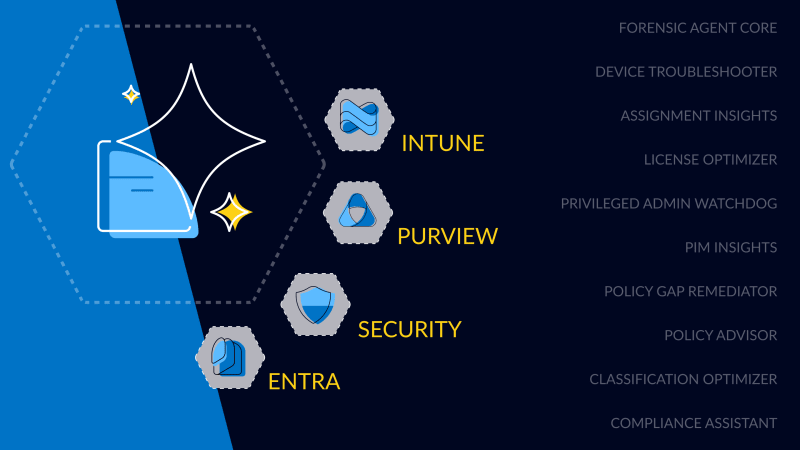
First Worldwide: glueckkanja Security Copilot Agents
glueckkanja is among the first partners in the Microsoft Security Store Preview, delivering 10 Microsoft-native Security Copilot Agents across Security, ...

Global Secure Access Unlocked
This blog explores how Microsoft Global Secure Access enhances security and control in our Managed Red Tenant. With Entra Internet ...
This is why you need a solid infrastructure to be agent-ready in 2025
Before Microsoft 365 Copilot Agents can deliver real value, the foundation must be solid: clean data, proper permissions, and a ...

Monitoring That Grows With You – Organic Solutions in Azure
How modern Azure monitoring creates transparency and leaves room for what matters most

Next Level Azure IaC: Azure Verified Modules
Infrastructure-as-Code (IaC), especially with Terraform, is a key component of our Azure Foundation and a fundamental element of every cloud ...

Inside Akira Stealer: A full technical analysis of a modular stealer
It started with a single Defender alert in Microsoft 365. No malware, no signatures, no panic. Just a whisper in ...
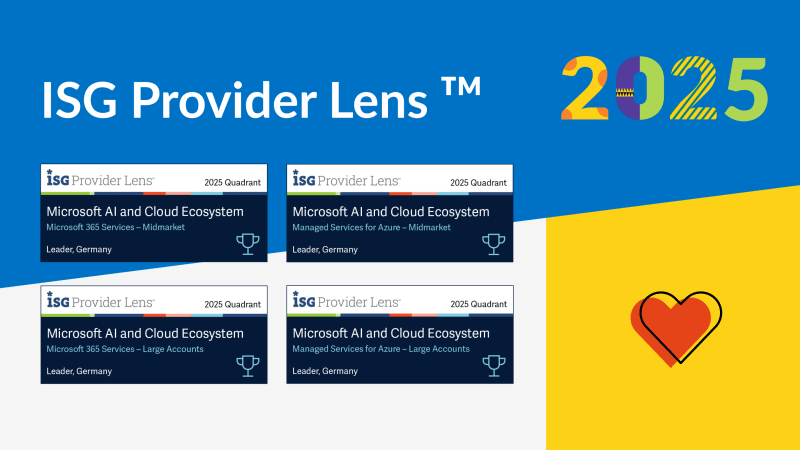
Four in a row. glueckkanja once again a Leader in ISG
The ISG Provider Lens™ 2025 study once again recognizes glueckkanja as a Leader in both Managed Services for Azure and ...
Switzerland steps up. glueckkanja becomes ISG Rising Star
glueckkanja Switzerland has been named a 'Rising Star' by ISG in the categories Microsoft 365 Services and Managed Services for ...

glueckkanja remains among the Top 5 MSSPs worldwide
The Microsoft Security Excellence Awards are among the most prestigious honors in the industry. At RSA Conference 2025 in San ...

Hello Clöud
Austrian companies are currently at a turning point. Digitalization is accelerating rapidly. At the same time, the demands on IT ...
'23, '24, '25 – the triple is complete!
glueckkanja is once again a finalist at the Security MSSP of the Year Awards, placing us among the world's leading ...

Compliant Device Bypass - All you need to know!
In this blog post, glueckkanja's MVP Fabian Bader, Chris Brumm and Thomas Naunheim gather details about the Compliant Device Bypass ...

How to Keep Your Azure VM Costs Under Control
Virtual Machines (VMs) in Azure can be more expensive than expected, especially without proper optimization. This article shows you how ...

Why Your Outdated Windows Servers Are Putting Your Business at Risk
Would you trust an airplane with critical failures to get you safely to your destination? Then why trust your Windows ...

glueckkanja is Launch Partner for Microsoft's SSE Solution
Thrilled to announce our role as ‘Product Launch Partner' for Microsoft's Security Service Edge (SSE) solution, Global Secure Access, which ...

Azure Container Services - modern, efficient and indispensable
Faster, leaner, more efficient – container technology is transforming the way businesses develop and deploy software. Learn more about how ...
Because the What Matters More Than the Where
Have you ever heard of Bill Gates' office chair? Do you know what it looks like? Ergonomic or simple? With ...
Network Management in Azure: Freedoms & Nuances
Discover the flexibility and security of Azure network solutions! Azure offers a wide range of networking services designed for IaaS, ...